Welcome to HaCkEr-BrAdRi

HaCkEr-BrAdRi you Quality Software's Free of Cost with full version Keep Visiting and Keep enjoying . . . Don't Forget To Comment on Posts.

HaCkEr-BrAdRi Features

HaCkEr-BrAdRi provide you cracked,registered, serial key, and much more for free

HaCkEr-BrAdRi Update Daily

Our Team Update Blog Daily Or Twice A Day With latest and Cool Stuff For You For Free Download . . .

HaCkEr-BrAdRi Give You Big Variety Of Software's

HaCkEr-BrAdRi Provide You Latest and registered software's. . .

HaCkEr-BrAdRi

A Solution Of Your Needs

Showing posts with label Ip Tools. Show all posts

Best Free Internet Speed Test Websites

Best Free Internet Speed Test Websites

Speed Test for Desktop Computers

Now days Internet speed test becomes a very popular way for users to check their 3G wireless or home office broadband network downloading and uploading bandwidth in Kbit/S or KBytes/S, or in some cases when additional VPN connection is involved, the speed test is a good measure to verify if the VPN service provides promised network performance. So whenever you start a new internet connection, before any web browsing activities, we strongly suggest everyone to perform a reliable network connection speed test, here is our compilation of the best online network speed test websites, bookmark this website and come back to perform speed test whenever you need.

www.speedtest.net  - Global most popular speed test service provided by Ookla

www.speakeasy.net/speedtest – USA’s best speed test website since day one

www.bandwidthplace.com – Fancy speed test web from USA, Europe and Aisa

www.speed.io – All-in-one versatile network speed test and connection performance test
www.dslreports.com/stest – One of the oldest speed test service for Java, Flash and Mobile

speedtest.comcast.net – USA Internet speed test from Cable Provider ComCast

my.verizon.com/micro/speedtest/broadband – Fiber internet speed test from Verizon Fios

www.att.com/speedtest – USA ISP speed test from USA Mobile Provider AT&T

www6.sprint.com/landings/speedtest/?ECID=vanity:speedtest – CDMA data mobile network speed test from Sprint USA

www.zdnet.com/broadband-speedtest – Broadband speed test from ZDNET

www.youtube.com/my_speed – Google YouTube Video Speed 30 days History

ipv6-test.com/speedtest – Speed Test from France, Romania and India

speedtest.xmission.com – XMission Speed test web app

speedtest.vonage.com – Speed test for Vonage VOIP phone service

www.schoolspeedtest.org – USA school campus network internet speed test

speedtest.sonic.net/ookla – Internet speed check from Sonic ISP

Hotspot Shield Elite Full Free Download Direct

Free Hotspot Shield Elite Full Download
allows you to browse the internet via a secure VPN that will detect and block malware, while protecting your privacy. Hotspot Shield Elite comes with advanced malware protection

Hotspot Shield Elite Full Free Download Direct at www.hackerbradri.com


Key Features
  • Privacy - Hide your IP and ensure anonymous browsing
  • Malware Protection Plus 
  • Dedicated Elite Network
File Info
File Type: .rar
File Size: 6.6mb
Uploaded on: 4shared.com
File is Without Password

 Download Link

Click Here To Download

Manually Extrect IP and port Info using Netstat

Manually Extract IP and port Info using Netstat


------------------------------------------------
Table of Contents:
------------------------------------------------

INTRO

I.Use of Netstat

II.Detecting Open ports

III.SYN and ACK

IV.Using Netstat it for ICQ and AIM

V.Other Uses
VI.Tools and Utilities

VII.Two Quick Tips
Conclusion


------------------------------------------------
Intro
------------------------------------------------
In This Post You Will Learn How To Extract IP and Port Manually Using Netstat

------------------------------------------------

I.Use of Netstat

------------------------------------------------
-  (To OPEN Netstat) - To open [Netstat] you must do the following: Click on the

-  [Start] button-->Then click [Programs]--> Then look for [Ms-Dos Prompt].

Netstat is a very helpful tool that has many uses. I personally use Netstat

to get IP addresses from other users I'm talking with on ICQ or AIM.  Also

you can use Netstat go moniter your port activity for attackers sending syn

requests (part of the TCP/IP 3 way handshake) or just to see what ports are

listening/Established. Look at the example below for the average layout of

a responce to typing Netstat at the C:\windows\ prompt.

~~~~~~~~~~~~~~~~~~~~

C:\WINDOWS>netstat


Active Connections


  Proto  Local Address          Foreign Address        State

  TCP    pavilion:25872         WARLOCK:1045           ESTABLISHED

  TCP    pavilion:25872         sy-as-09-112.free.net.au:3925  ESTABLISHED

  TCP    pavilion:31580         WARLOCK:1046           ESTABLISHED

  TCP    pavilion:2980          205.188.2.9:5190       ESTABLISHED

  TCP    pavilion:3039          24.66.10.101.on.wave.home.com:1031  ESTABLISHED
~~~~~~~~~~~~~~~~~~~

Now look above at the example. You will see [Proto] on the top left. This just

tells you if the protocal is TCP/UDP etc. Next to the right you will see

[Local Address] this just tells you the local IP/Hostname:Port open.  Then to the

right once again you will see [Foreign Address] this will give you the persons

IP/Hostname and port in the format of IP:Port with ":" in between the port and IP.

And at last you will see [State] Which simply states the STATE of the connection.

This can be Established if it is connected or waiting connect if its listening.

Now with this knowledge we will dive into deeper on how to use this for monitering

and port activity and detecting open ports in use.

------------------------------------------------
II.Detecting Open ports
------------------------------------------------
Now so you are noticeing something funny is going on with your computer? Your cd-rom

tray is going crazy...Opening and closing when your doing nothing. And you say What the

phruck is going on..or you realize someones been messing with a trojan on your computer.

So now your goal is to locate what trojan it is so you can remove it right? Well your right.

So you goto your ms-dos prompt. Now there are many ways to use Netstat and below is a help

menu. Look through it.

~~~~~~~~~~~~~~~~~~~~

C:\WINDOWS>netstat ?


Displays protocol statistics and current TCP/IP network connections.


NETSTAT [-a] [-e] [-n] [-s] [-p proto] [-r] [interval]


  -a            Displays all connections and listening ports.

  -e            Displays Ethernet statistics. This may be combined with the -s

                option.

  -n            Displays addresses and port numbers in numerical form.

  -p proto      Shows connections for the protocol specified by proto; proto

                may be TCP or UDP.  If used with the -s option to display

                per-protocol statistics, proto may be TCP, UDP, or IP.

  -r            Displays the routing table.

  -s            Displays per-protocol statistics.  By default, statistics are

                shown for TCP, UDP and IP; the -p option may be used to specify

                a subset of the default.

  interval      Redisplays selected statistics, pausing interval seconds

                between each display.  Press CTRL+C to stop redisplaying

                statistics.  If omitted, netstat will print the current

                configuration information once.

~~~~~~~~~~~~~~~~~~~~~

I personally like using (C:\Windows\Netstat -an) Which Displays all connections and

listening ports in the form of IP instead of Hostname.  As you see how i did the command

Netstat(space)-a(Displays all connections and listening ports.)n(in numerical form)

Netstat -an  -So doing that does TWO of the options at once no need for -a-n.  So

now that you know how to use netstat to view all your connections and listening you

can search for common ports like 12345(old Netbus Trojan),1243(subseven) etc.  This

Becomes very handy for everything you will soon find out. Take a break now and go chill

out on your couch and relax for about 5 minutes and let all this soak in then come back

ready to learn more. :)

------------------------------------------------
III.SYN and ACK
------------------------------------------------

When you here Syn and Ack(ACKnowledge) you do not think of the communication of packets on

your system. Well let me tell you what SYN and ACK do.

    [SYN] - SYN in common words is a request for a connection used in the 3-way handshake

in TCP/IP. Once you send a SYN out for a connection, the target computer will reply with a SYN and ACK. So basically when you see in [State] catagory Syn that means you are sending

out a request to connect to something.

    [ACK] - Now the ACK is a ACKnowledgement to the request made by a computer that is

trying to connect to you. Once a Syn is sent to you you need to ACK it, then Send back another syn to the computer requesting connection to confirm the packet sent was correct.

I sure hope that helped you understand a little more about SYN and ACK. If you have further

questions try looking for texts on TCP/IP (such as BSRF's TCP/IP text - blacksun.box.sk/tcpip.txt). Now onto the fun stuff.

------------------------------------------------
IV.Using Netstat it for ICQ and AIM
------------------------------------------------
Have you ever wanted to get someones IP address or hostname using [Aol Instant Messanger]

or [ICQ]? Well your in Luck.

    [AIM] - With AIM you can not ussually find the exact IP address without some trial and error because most of the time it seems to open up all online users on Port

5190. So Less users online easier it is. So goto Ms-Dos Prompt and type netstat -n here you will see under [Foreign Addresses] a IP:With port 5190. Now one of those IP's connected

to you with 5190 is going to be your target aim user. Just use trial and error to find out

is ussually the easiest way.

    [ICQ] - To get a IP using netstat of a ICQ user is easy before talking to the person on ICQ you must open ms-dos prompt and do netstat -n to list all IP's and ports.Write them

down or copy them somewhere you will remember to look back. Now it's time to find out his

IP. Message the user witha  single message now quickly do Nestat -n. And you will have a new added line of a IP address, just search for the new one on the list under foreign and once you find it you now have your buddys ip without any patches or hacks. Pure skill :P.

------------------------------------------------
V.Other Uses
------------------------------------------------


Netstat can be used to get IPs of anything and anyone, as long as there's a direct connection between you and the target (i.e. direct messages, file transfers or ICQ chats in ICQ, DCC (Direct Client Connection) chat and file transfers in IRC etc' etc').


------------------------------------------------
VI.Tools and Utilities:
------------------------------------------------
You Can Download Many Port Scanners From our Web site Free Full Working
 Some Are Online Scanners And Some Are Tools


Click here To Download Latest Port Scanners on HaCkEr-BrAdRi

Moorer Port Scanner
------------------------------------------------
VII.Two Quick Tips
------------------------------------------------


a.
Sometimes Netstat can generate very long lists, which are especially confusing for newbies. If you're having difficulties, just run netstat, and then make a direct connection of some sort to your target, or make it connect to you (ICQ, IRC etc', you get the picture) and run netstat again. There should be a new line - this is what you're looking for.
b.If netstat's output is too long, type 'netstat -an > c:\some-directory\some-file.txt' (without the quotes, and you can replace the parameters -an and the filename and it's path with anything you'd like). This will dump the output to that file for easy viewing, and will also let you copy & paste.

------------------------------------------------
Conclusion
------------------------------------------------


I think there are better ways to understand the internet than with tools you find.
Learn how to do stuff manually so you fully understand whats going on. This will fuel your
power and kill your lameness :)

DDOS Attacker Tool By HaCkEr BrAdRi ( Beta )

DDOS Attacker Tool By Hacker-Bradri (Beta Version )

This is small DDOS tool Which send Unlimited pings to IP / Domain

Screen Shots:

Simple Tool And Easy in Use

Features:

This Tools Will Detect Real IP of
Victim and which helps you to Attack
on Real Address.


1) Tool Will Find Real IP of Victim

2)  Random Number of  Packets ( 1 to 255 )

3) Unlimited pings on Victim 


Click Here To Download

WARNING:
 DO NOT USE THIS TOOL CARELESSLY!
AND
THIS IS ONLY FOR EDUCATIONAL PURPOSE ONLY

Acunetix Web Vulnerability Scanner 7.0 Incl / With Activator Free Download Full

Audit your website security with Acunetix Web Vulnerability Scanner

Acunetix Web Vulnerability Scanner 7.0 Incl Activator freee download full 4shared.com hackerbradri.com
As many as 70% of web sites have vulnerabilities that could lead to the theft of sensitive corporate data such as credit card information and customer lists.
Hackers are concentrating their efforts on web-based applications - shopping carts, forms, login pages, dynamic content, etc. Accessible 24/7 from anywhere in the world, insecure web applications provide easy access to backend corporate databases.
Firewalls, SSL and locked-down servers are futile against web application hacking!
Web application attacks, launched on port 80/443, go straight through the firewall, past operating system and network level security, and right in to the heart of your application and corporate data. Tailor-made web applications are often insufficiently tested, have undiscovered vulnerabilities and are therefore easy prey for hackers.
Acunetix - a world-wide leader in web application security
Acunetix has pioneered the web application security scanning technology: Its engineers have focused on web security as early as 1997 and developed an engineering lead in web site analysis and vulnerability detection.
Acunetix Web Vulnerability Scanner includes many innovative features:
  • AcuSensor Technology
  • An automatic client script analyzer allowing for security testing of Ajax and Web 2.0 applications
  • Industries' most advanced and in-depth SQL injection and Cross site scripting testing
  • Advanced penetration testing tools, such as the HTTP Editor and the HTTP Fuzzer  
  • Visual macro recorder makes testing web forms and password protected areas easy
  • Support for pages with CAPTHCA, single sign-on and Two Factor authentication mechanisms
  • Extensive reporting facilities including VISA PCI compliance reports
  • Multi-threaded and lightning fast scanner crawls hundreds of thousands of pages with ease
  • Intelligent crawler detects web server type and application language
  • Acunetix crawls and analyzes websites including flash content, SOAP and AJAX
  • Port scans a web server and runs security checks against network services running on the server 

Free Fastest Online Remote Desktop Scanner

Fastest Online Remote Desktop Scanner

Online Remote Desktop Scanner with IP Range

Free Fastest Online SSH Scanner

Fastest Online SSH Scanner

Scan And Enjoy

Free Online VNC Scanner

Free Online VNC Scanner with IP Range Enjoy The Scanner

Online Port Scanner Free

Free Online Port Scanner Which Scan Ports Of Websites For Free


whatismyip.com clone free download working


What Is My IP Address - IP Lookup, Change IP, IP WHOIS, Internet Speed Test, Trace An Email, Host Name Lookup, User Agent, Server Headers Check

Click here To Download

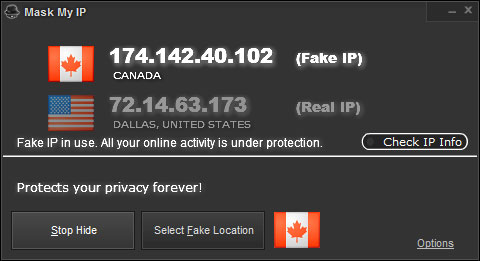
Mask My IP Pro Full Version Free Download With Patch

Mask my ip www.hackerbradri.com hacker bradri free downloads
Mask My IP Is One Of The Best Software For Change Your IP Easily And Stay Anonymous Online. This Software Is More Powerful Then Hide My Ip. Because It Can Change IP In Only 1 Second It Has Many Other Good Features.


mask mp ip with Patch Free Download www.hackerbradri.com


Here Are Key Features Of Mask My IP :


Hide Real IP Address And Stay Anonymous
Change Your IP Address In One Second
Change IP Address Based On Country
Guard Against Hackers
Protect All Connections Including WiFi
Defend In The Forums Once Banned
Many IP Addresses To Use
Amazing User Interference And Design

Net BIOS Name Scanner


Net BIOS Name Scanner

 Click Here To Download

Hide Ip easy

IP Net Info

IPNetInfo is a small utility that allows you to easily find all available information about an IP address: The owner of the IP address, the country/state name, IP addresses range, contact information (address, phone, fax, and email), and more.

This utility can be very useful for finding the origin of unsolicited mail. You can simply copy the message headers from your email software and paste them into IPNetInfo utility. IPNetInfo automatically extracts all IP addresses from the message headers, and displays the information about these IP addresses.

Click Here To Download

Hide Ip easy registered

Hide Ip easy
Hide IP Easy - Protect Your Privacy Easily on the Internet.
Browsing on the Internet is becoming more and more dangerous in today's world. Hackers and identity thieves are trying to use IP address to get any information out of you: home address, credit card information, social security information, your bank accounts and other personal information.

Actually, keeping your privacy is simple and easy. Use Hide IP Easy to hide your real IP with a fake one, surf anonymously, prevent hackers from monitoring your activity, and provide full encryption of your online activity, all with the click of a button.